Add a bottom sheet with snap points
This tutorial adds a bottom sheet to an Expo app with React Native Bottom Sheet. The sheet has two snap points, at 25% and 50% of the screen. A button above it moves the sheet to 50%, and a label shows which snap point the sheet is at. A test file checks that the sheet renders and what the button does, and two screenshots of the web export show the sheet before and after the button is pressed.
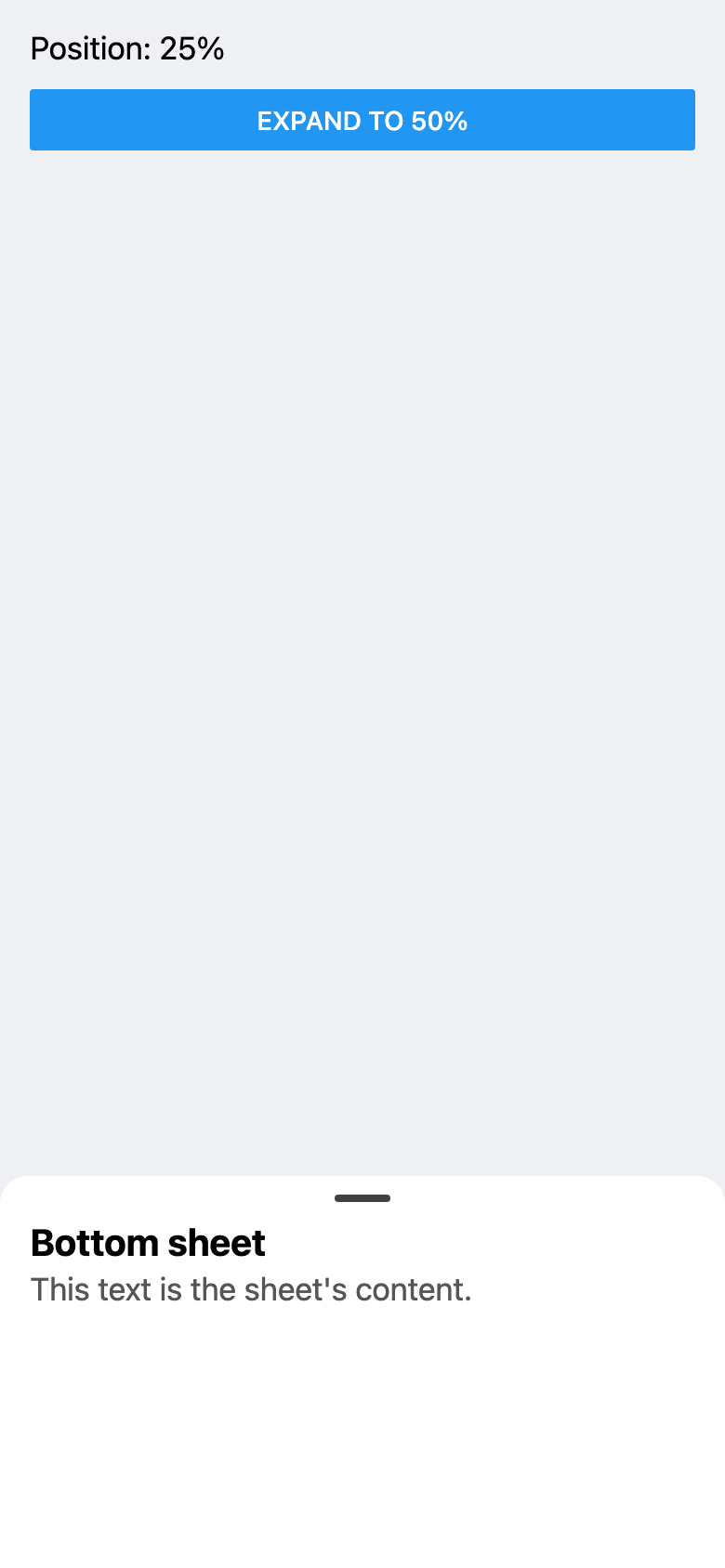
The example is an Expo project. Its own files are App.tsx, src/Sheet.tsx and __tests__/Sheet.test.tsx. It uses React Native Bottom Sheet 5.2.14, from the @gorhom/bottom-sheet package, with react-native-reanimated 4.7.1, react-native-worklets 0.13.0 and react-native-gesture-handler 3.3.0. For what changed in version 5, see React Native Bottom Sheet v5 released with Web support.
The app
import { StatusBar } from 'expo-status-bar';
import { StyleSheet } from 'react-native';
import { GestureHandlerRootView } from 'react-native-gesture-handler';
import { SafeAreaProvider, SafeAreaView } from 'react-native-safe-area-context';

import { Sheet } from './src/Sheet';

export default function App() {
  return (
    // Gestures are recognized only inside GestureHandlerRootView, so it
    // wraps the whole app.
    <GestureHandlerRootView style={styles.container}>
      <SafeAreaProvider>
        <SafeAreaView style={styles.container}>
          <Sheet />
          <StatusBar style="auto" />
        </SafeAreaView>
      </SafeAreaProvider>
    </GestureHandlerRootView>
  );
}

const styles = StyleSheet.create({
  container: { flex: 1 },
});GestureHandlerRootView, from Gesture Handler, wraps the whole app. Inside it, SafeAreaView, from react-native-safe-area-context, holds Sheet, the app's one screen.
The sheet
import BottomSheet, { BottomSheetView } from '@gorhom/bottom-sheet';
import { useRef, useState } from 'react';
import { Button, StyleSheet, Text, View } from 'react-native';

// The heights the sheet stops at, as a share of the screen: index 0 is 25%,
// index 1 is 50%.
const snapPoints = ['25%', '50%'];

export function Sheet() {
  const sheetRef = useRef<BottomSheet>(null);
  // The index of the snap point the sheet is at. It starts at 0, the
  // sheet's default index.
  const [index, setIndex] = useState(0);

  return (
    <View style={styles.screen}>
      <Text style={styles.label}>Position: {snapPoints[index]}</Text>
      <Button title="Expand to 50%" onPress={() => sheetRef.current?.snapToIndex(1)} />
      <BottomSheet
        ref={sheetRef}
        snapPoints={snapPoints}
        // Dynamic sizing is on by default in version 5. Off, the sheet
        // stops only at the snap points.
        enableDynamicSizing={false}
        onChange={(next) => setIndex(next)}
      >
        <BottomSheetView style={styles.content}>
          <Text style={styles.title}>Bottom sheet</Text>
          <Text style={styles.text}>This text is the sheet's content.</Text>
        </BottomSheetView>
      </BottomSheet>
    </View>
  );
}

const styles = StyleSheet.create({
  screen: { flex: 1, padding: 16, gap: 12, backgroundColor: '#eef0f3' },
  label: { fontSize: 17 },
  content: { paddingHorizontal: 16, paddingBottom: 16 },
  title: { fontSize: 20, fontWeight: '700', marginBottom: 4 },
  text: { fontSize: 17, color: '#555' },
});
snapPoints lists the heights the sheet stops at, as shares of the screen: index 0 is '25%' and index 1 is '50%'. The sheet opens at index 0, its default, as the first screenshot shows, so the index state starts at 0 too.
BottomSheet gets the snap points and a ref, sheetRef. The button calls sheetRef.current?.snapToIndex(1), which moves the sheet to the snap point at index 1, 50%. When the sheet moves to a snap point, it calls onChange with that snap point's index. The handler stores it in index, and the label shows the matching snap point, as the second screenshot shows.
enableDynamicSizing={false} keeps the sheet to the two snap points. As the version 5 post linked above says, dynamic sizing is on by default. BottomSheetView holds the sheet's content: a title and a line of text.
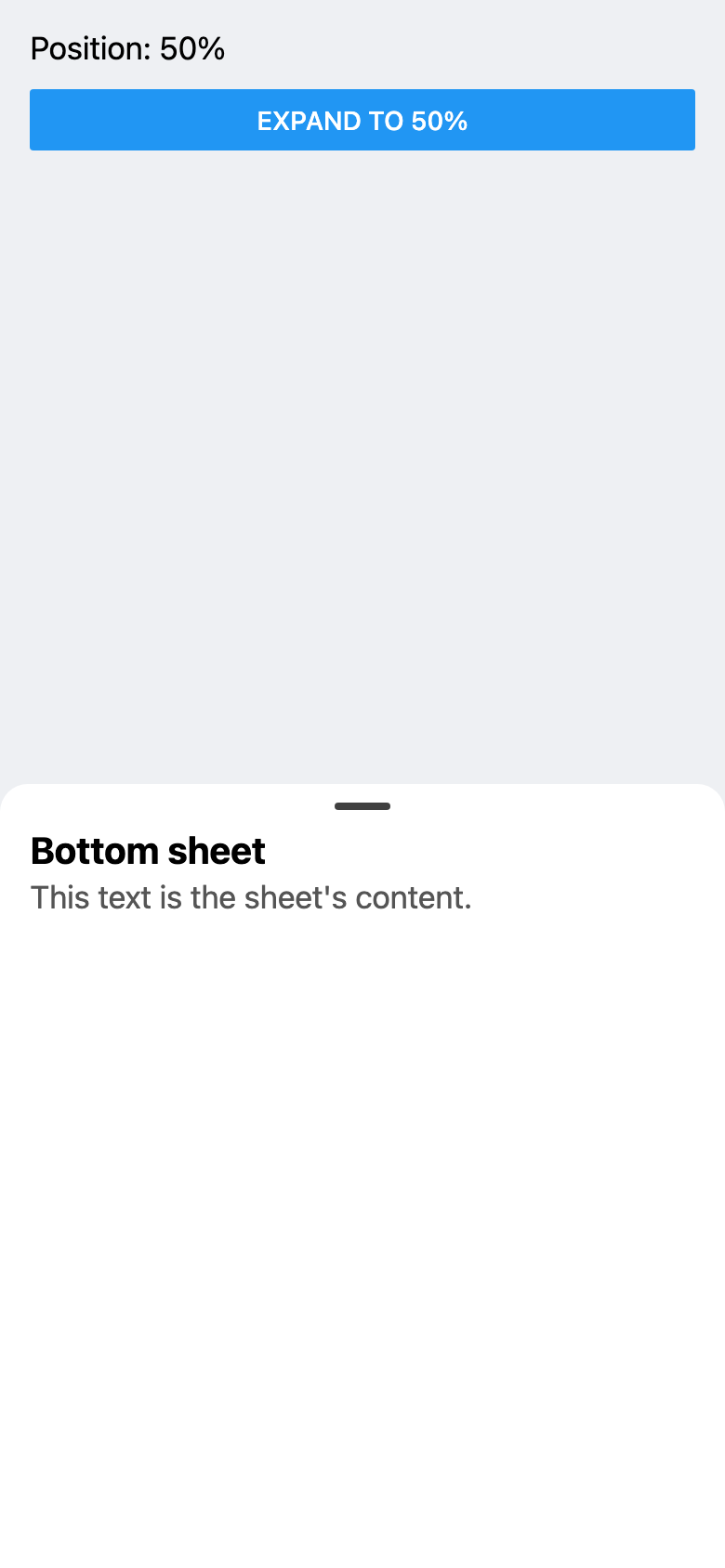
Both screenshots show the web export, with the real library, in a 390 by 844 window. The second one was taken after clicking the button. Before each one, the screenshot script waits for the label to show the position, then checks that the sheet's top is at 75%, then at 50%, of the window's height. On web, React Native's Button shows its title in capitals.
The test
import { render, screen, userEvent } from '@testing-library/react-native';

import { Sheet } from '../src/Sheet';

// The mock that Bottom Sheet documents in its mock.js, plus
// `__esModule: true`. That CommonJS file lacks the flag, and without it the
// default import (BottomSheet) would get the whole module object.
// The mock's sheet renders its content in place, and its methods, such as
// snapToIndex, do nothing: they don't move the sheet or call onChange.
jest.mock('@gorhom/bottom-sheet', () => ({ __esModule: true, ...require('@gorhom/bottom-sheet/mock') }));

test('the sheet content and the position label render', async () => {
  await render(<Sheet />);

  expect(screen.getByText('Bottom sheet')).toBeOnTheScreen();
  expect(screen.getByText("This text is the sheet's content.")).toBeOnTheScreen();
  expect(screen.getByText('Position: 25%')).toBeOnTheScreen();
});

test('pressing the button snaps the sheet to index 1', async () => {
  // The mock's sheet is a class. The spy records the calls to its
  // snapToIndex method and still runs it.
  const { default: MockBottomSheet } = jest.requireMock('@gorhom/bottom-sheet');
  const snapToIndex = jest.spyOn(MockBottomSheet.prototype, 'snapToIndex');
  const user = userEvent.setup();
  await render(<Sheet />);

  await user.press(screen.getByRole('button', { name: 'Expand to 50%' }));

  expect(snapToIndex).toHaveBeenCalledTimes(1);
  expect(snapToIndex).toHaveBeenCalledWith(1);
  snapToIndex.mockRestore();
});
The tests run in Jest with the jest-expo preset, the only Jest setting in the example's package.json, and use React Native Testing Library to render Sheet and press the button.
jest.mock replaces @gorhom/bottom-sheet with the mock that the library ships in its mock.js file. The mock's sheet renders its content in place, and its methods, such as snapToIndex, do nothing. The test adds __esModule: true to the mock because mock.js is a CommonJS file without that flag, and without it, import BottomSheet from '@gorhom/bottom-sheet' gets the whole module object instead of the sheet.
The two tests cover these behaviors:
- the sheet's title and text render, with the label "Position: 25%";
- pressing "Expand to 50%" calls
snapToIndexonce, with the index 1.
The second test checks the call with jest.spyOn on the mock sheet's snapToIndex. The spy records each call and still runs the mock's method.
Because the mock's snapToIndex does nothing, it doesn't move the sheet or call onChange, so the tests don't check the label after the press. The tests show that the sheet's content renders and that the button asks for the snap point at index 1. The screenshots, from the real library on web, show the sheet moving to 50% and the label changing to "Position: 50%".
Verified with Expo SDK 58 (React Native 0.88.1): type-checked, tested with Jest and React Native Testing Library, and exported for web.
Full example: reactnative/examples/bottom-sheet