Build a searchable list with FlatList and TextInput
This tutorial builds a search field above a list. Typing in the field filters the list, without regard to case. When nothing matches, the list shows "No matches". The code is one component, SearchableList, made of a TextInput and a FlatList, and a test file that checks each of these behaviors.
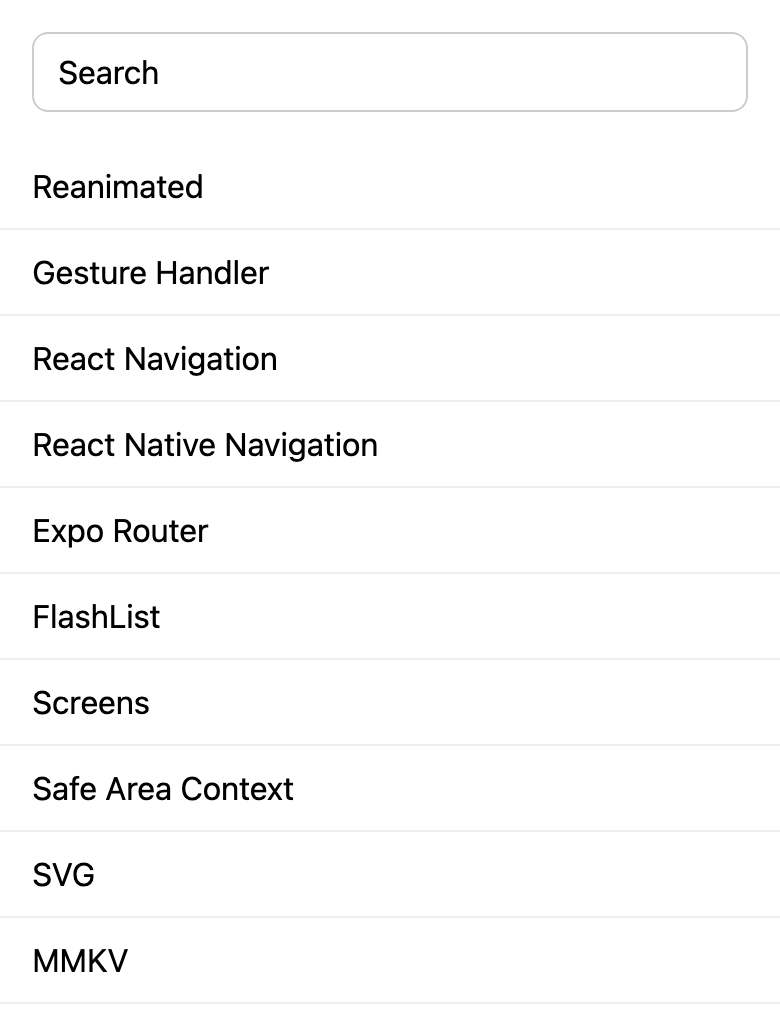
The example is an Expo project. Its own files are App.tsx, src/SearchableList.tsx, src/data.ts and __tests__/SearchableList.test.tsx. The sample data in src/data.ts is ten React Native libraries. Each has an id, the library's npm package name, and a name, the text shown in the list.
The component
import { useState } from 'react';
import { FlatList, StyleSheet, Text, TextInput, View } from 'react-native';

export type Item = { id: string; name: string };

export function SearchableList({ items }: { items: Item[] }) {
  const [query, setQuery] = useState('');
  const matches = items.filter((item) =>
    item.name.toLowerCase().includes(query.toLowerCase()),
  );

  return (
    <View style={styles.container}>
      <TextInput
        style={styles.input}
        value={query}
        onChangeText={setQuery}
        placeholder="Search"
        accessibilityLabel="Search"
        autoCapitalize="none"
        autoCorrect={false}
      />
      <FlatList
        data={matches}
        keyExtractor={(item) => item.id}
        renderItem={({ item }) => <Text style={styles.row}>{item.name}</Text>}
        ListEmptyComponent={<Text style={styles.empty}>No matches</Text>}
      />
    </View>
  );
}

const styles = StyleSheet.create({
  container: { flex: 1 },
  input: {
    margin: 16,
    paddingHorizontal: 12,
    paddingVertical: 10,
    borderWidth: 1,
    borderColor: '#ccc',
    borderRadius: 8,
    fontSize: 16,
  },
  row: {
    paddingHorizontal: 16,
    paddingVertical: 12,
    borderBottomWidth: 1,
    borderBottomColor: '#eee',
    fontSize: 16,
  },
  empty: { padding: 16, color: '#666', fontSize: 16 },
});
SearchableList takes an items prop, an array of { id, name } objects, and keeps one piece of state: query, the text in the search field.
How filtering works
The TextInput is controlled: its value is query, and onChangeText passes each new text to setQuery. Each change renders the component again.
On every render, matches is computed from items and query. An item matches when its name, in lower case, includes the query, in lower case. Lowering both sides makes the search case-insensitive, so "nav" matches "React Navigation". The filtered array is not kept in state of its own: it is derived from the two values it depends on, so it cannot get out of step with them.
An empty query matches every item, because every string includes the empty string. That is why clearing the field shows the whole list again, with no special case in the code.
FlatList gets matches as its data, and keyExtractor gives each row the item's id as its key. The ids in src/data.ts are package names, so they are unique, and filtering does not change them.
The input has accessibilityLabel="Search". The test finds the field by that label rather than by a test ID.
The empty state
When matches is empty, FlatList renders its ListEmptyComponent instead of rows: here, a Text that says "No matches". Typing "zzz" shows it, and the test checks that no item is shown with it.
Using the component
import { StatusBar } from 'expo-status-bar';
import { StyleSheet } from 'react-native';
import { SafeAreaProvider, SafeAreaView } from 'react-native-safe-area-context';

import { libraries } from './src/data';
import { SearchableList } from './src/SearchableList';

export default function App() {
  return (
    <SafeAreaProvider>
      <SafeAreaView style={styles.container}>
        <SearchableList items={libraries} />
        <StatusBar style="auto" />
      </SafeAreaView>
    </SafeAreaProvider>
  );
}

const styles = StyleSheet.create({
  container: { flex: 1, backgroundColor: '#fff' },
});
App.tsx renders the list with the sample data inside a SafeAreaProvider and a SafeAreaView from react-native-safe-area-context.
The test
import { render, screen, userEvent } from '@testing-library/react-native';

import { libraries } from '../src/data';
import { SearchableList } from '../src/SearchableList';

const names = libraries.map((item) => item.name);

test('shows every item', async () => {
  await render(<SearchableList items={libraries} />);

  for (const name of names) {
    expect(screen.getByText(name)).toBeOnTheScreen();
  }
});

test('typing "nav" shows only the matching items', async () => {
  const user = userEvent.setup();
  await render(<SearchableList items={libraries} />);

  await user.type(screen.getByLabelText('Search'), 'nav');

  const matching = ['React Navigation', 'React Native Navigation'];
  for (const name of names) {
    if (matching.includes(name)) {
      expect(screen.getByText(name)).toBeOnTheScreen();
    } else {
      expect(screen.queryByText(name)).not.toBeOnTheScreen();
    }
  }
});

test('typing "zzz" shows "No matches"', async () => {
  const user = userEvent.setup();
  await render(<SearchableList items={libraries} />);

  await user.type(screen.getByLabelText('Search'), 'zzz');

  expect(screen.getByText('No matches')).toBeOnTheScreen();
  for (const name of names) {
    expect(screen.queryByText(name)).not.toBeOnTheScreen();
  }
});

test('clearing the search shows every item again', async () => {
  const user = userEvent.setup();
  await render(<SearchableList items={libraries} />);
  const search = screen.getByLabelText('Search');

  await user.type(search, 'zzz');
  await user.clear(search);

  expect(screen.queryByText('No matches')).not.toBeOnTheScreen();
  for (const name of names) {
    expect(screen.getByText(name)).toBeOnTheScreen();
  }
});
The test runs in Jest, with the jest-expo preset set in the example's package.json, and uses React Native Testing Library. Each test renders the component with the sample data. render and each user action are awaited before the assertions. userEvent.setup() creates the user; user.type types into the field, found with getByLabelText('Search'), and user.clear empties it.
The four tests cover the behaviors above:
- every item is shown at first;
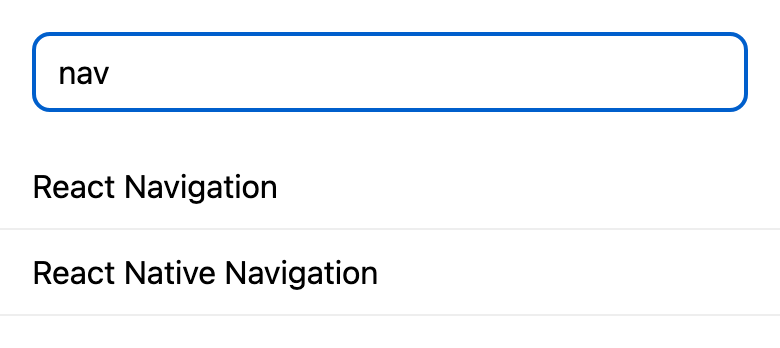
- typing "nav" shows "React Navigation" and "React Native Navigation", and none of the other eight items;
- typing "zzz" shows "No matches" and no item;
- clearing the field after "zzz" removes "No matches" and shows every item again.
toBeOnTheScreen() is one of the Jest matchers that come with React Native Testing Library. The example needs no setup file for them.
Both screenshots show the example's web export in a 390 by 844 window. This is the second one, after typing "nav":
Verified with Expo SDK 58 (React Native 0.88.1): type-checked, tested with Jest and React Native Testing Library, and exported for web.